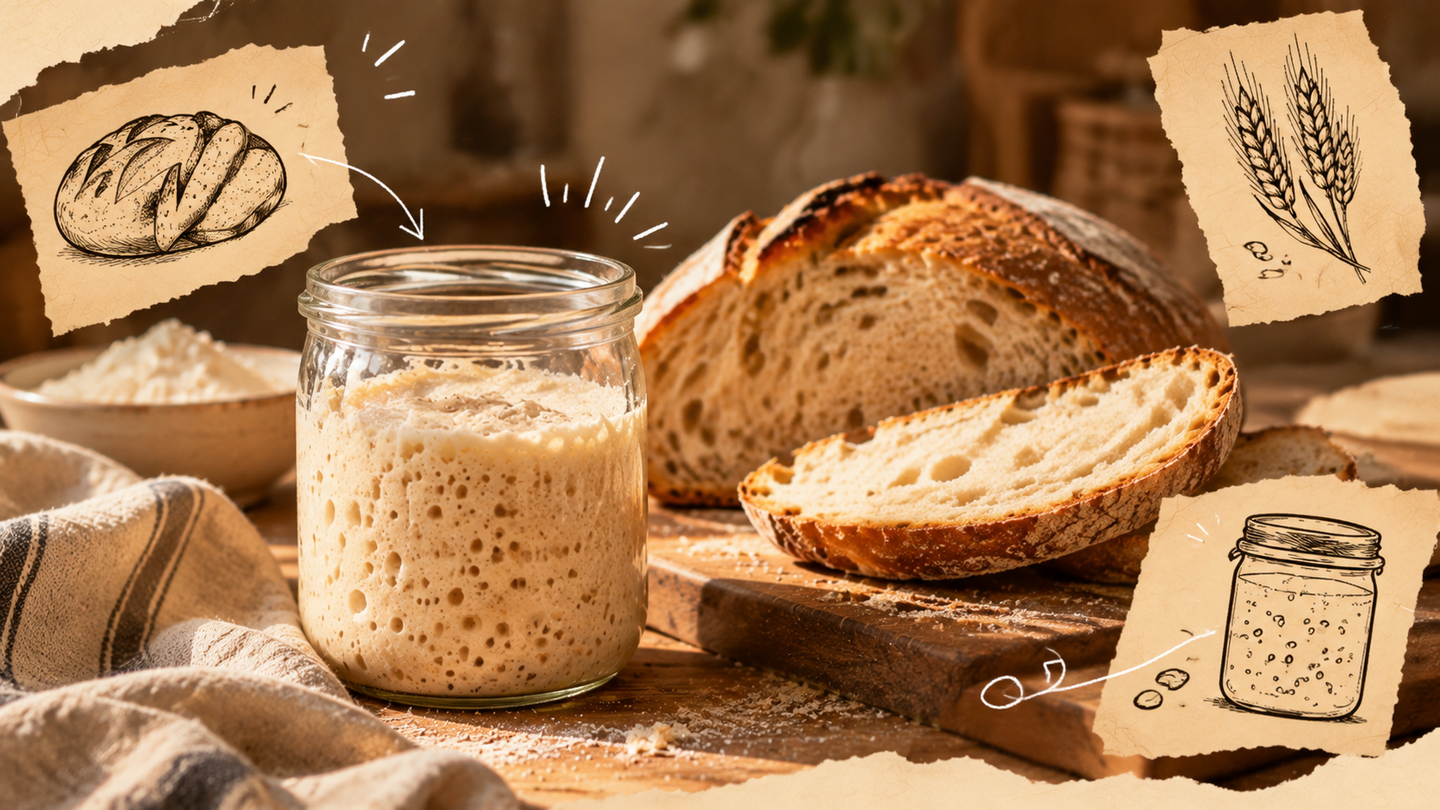
Media Concept
«Live Starter» is an educational media platform for those who want to learn how to bake homemade bread using a natural sourdough starter from scratch.
Baking bread at home requires an understanding of the processes that occur during fermentation. Beginners often find it difficult to determine the condition of their starter or to grasp the reasons behind failed baking attempts. Ready-made recipes often assume that the cook is already familiar with the basic principles of working with dough. Therefore, even when following instructions precisely, the result may differ from expectations.The «Living Starter» project offers a systematic way to master bread making through practical sessions. Each material is dedicated to a specific stage of preparation and is accompanied by visual examples. Readers will gradually become familiar with the nuances of sourdough and learn to independently assess the changes taking place.
Main platform: Telegram.
Secondary platform: Pinterest.
Target audience: individuals aged 20–45 interested in home baking who want to learn to make sourdough bread without prior training.
Goal: to help beginners master homemade bread making through sequential instructions and practical explanations.
Core thematic areas: — Introduction to sourdough starters. — Daily sourdough maintenance. — Care and storage. — Baking your first loaf. — Addressing common pitfalls. — Sourdough baking in daily life.
Data Sources for Media
Expert and informational resources.
The project is based on materials containing verified information about bread baking.
Sources: — Professional books and instructional guides on baking; — Scientific articles on lactic acid bacteria, yeasts, and fermentation; — Technical handbooks on flour and baking processes; — Recipes and instructions from professional bakers; — Educational materials from specialized schools and bakeries.
Data Acquired: — Characteristics of natural sourdough starters; — Principles of fermentation; — Types of flour and their properties; — Ingredient proportions; — Temperature regimes; — Stages of bread preparation; — Causes of common errors.
This data forms the core knowledge base upon which the AI relies when preparing answers.
Visual Resources.
Visual information is particularly crucial for a project, as many changes in sourdough and dough are easier to show than to describe with words.
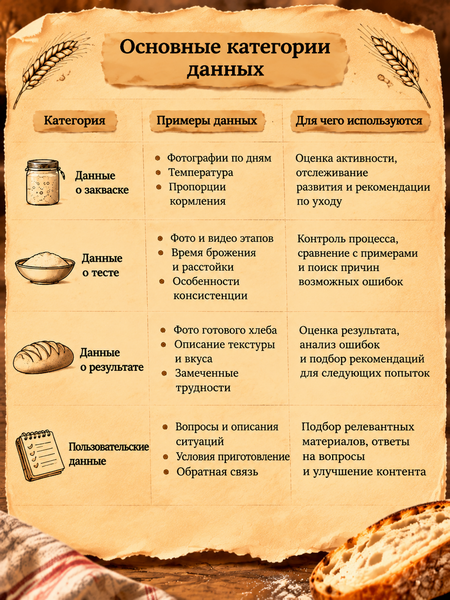
- Original Photography. The primary source for unique visual content for the project. Photos are taken independently during the sourdough cultivation and bread-making process.— Documenting the self-grown sourdough stages. — Tracking daily changes. — Photographing the dough preparation and baking process. — Creating comparative images of successful versus unsuccessful results.These photographs will be used in step-by-step guides, instructional cards, and materials for Telegram and Pinterest.
- Free Stock Photos. These are used to find supplementary photographs that help complete publications and maintain the visual style of the project.
— Unsplash — photographs of homemade baked goods, bread, ingredients, kitchen interiors, and still life photography. — Pexels — photo and video materials about cooking, baking, and kitchen processes.
Stock photos are primarily used to design covers, thematic collections, and illustrate general publications. Before use, you must check the license terms for each specific material.
- Professional Educational Resources. These resources are used to find additional visual examples and to study technological processes.— The Perfect Loaf — photographs and video materials for baking recipes and instructions. — Breadtopia — visual guides for starter cultivation and bread making. — King Arthur Baking — educational materials, recipes, and photos covering various stages of baking.The materials from these resources are primarily used for study and analysis. To directly include photographs in your own media, you must separately check the usage permissions.
- User Photographs. In the long term, the project may receive photographs directly from the studio.
— Photographs of the sourdough starter at different stages of growth. — Images of the dough during preparation. — Photographs of the finished bread. — Examples of unsuccessful outcomes and encountered problems.
These materials can be used to analyze user scenarios, build a visual reference library, and improve educational content. Photograph publication is only possible with the author’s consent.
Data schema separated for human and machine processing
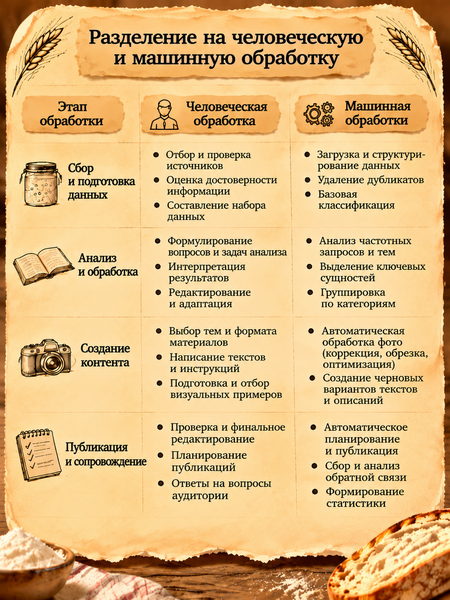
For the project, a hybrid data processing model is proposed. This model involves the collaborative work of humans and automated services. Machine processing is responsible for data collection, sorting, calculations, pattern recognition, and information preparation. The human element is responsible for expert evaluation, verification of accuracy, and making final decisions.
Example of the system in action: a user encounters a problem. Let’s consider a situation where someone is cultivating a sourdough starter and notices that it has stopped increasing in volume.
Information Input. The user submits a photograph of the sourdough starter and provides the following details: — Date of cultivation; — Type of flour used; — Proportions of flour and water; — Time of the last feeding; — Room temperature; — Observations regarding odor, consistency, and bubbling.
Machine Processing. The AI analyzes the text and the photograph, identifies discernible visual cues, and correlates them with technological data from the knowledge base.
Hypothesis Generation. The system proposes possible explanations for what is occurring. For example, a change in activity level may be linked to temperature, feeding regimen, or the specific development characteristics of the culture.
Verification. If the data is insufficient, the AI asks follow-up questions. If necessary, the situation is escalated to a human expert.
Personalized Recommendation. The user receives an explanation, links to relevant educational materials, and recommendations for ongoing monitoring.
Feedback. The results can be used to improve the knowledge base and identify topics that pose the greatest difficulty for beginners.
Personalizing the educational path.
A specific function of the system is selecting information based on the user’s needs.
Thus, the educational path remains structurally consistent, but the depth and method of information delivery can vary.
Guidelines for Automated Services within the Scheme
To implement the project, we propose using a set of services, each performing a specific function. Crucially, the system should not be overcomplicated: in the initial phase, a few tools will suffice to handle information gathering, processing, storage, and distribution.
1. ChatGPT — Information Analysis and Processing
Features in the project: — Analysis of sourdough and dough photographs. — Matching user observations with technical information. — Identifying potential causes of problems. — Selecting learning materials for specific stages. — Calculating ingredient proportions. — Drafting publications and instructions.
Guidelines: 1) Use the project’s verified knowledge base as the foundation for responses. 2) When analyzing photographs, always take into account additional details about the preparation process. 3) Differentiate between visually observed signs and hypotheses regarding their causes. 4) Do not present assumptions as confirmed facts. 5) If information is insufficient, ask clarifying questions. 6) Do not publish technical recommendations without expert verification.
Example prompt for starter analysis: Analyze the photograph of the sourdough starter along with the provided information about its cultivation. Identify visible signs: presence of bubbles, volume changes, structure, and consistency. Take into account the type of flour, ingredient ratios, room temperature, and time elapsed since the last feeding. Suggest possible explanations for the observed condition, indicate the level of certainty, and specify what additional data is required. Do not draw categorical conclusions based solely on the photograph.
2. Notion — Knowledge Base Storage and Structuring
Project Features: — Storage of validated recipes and instructions. — Creation of a database of common errors. — Organization of information by thematic sections. — Storage of links to primary sources. — Content plan management.
Guidelines: 1) Categorize materials into six main thematic areas of the project. 2) For each material, specify the source and date of addition. 3) Use a unified format for recipe descriptions. 4) Mark the verification status of each material. 5) Store photos alongside the description of the corresponding stage. 6) Separate expert-provided data from AI-generated materials.